
By Partow Ads Editorial Team | Last reviewed: 19 November 2026
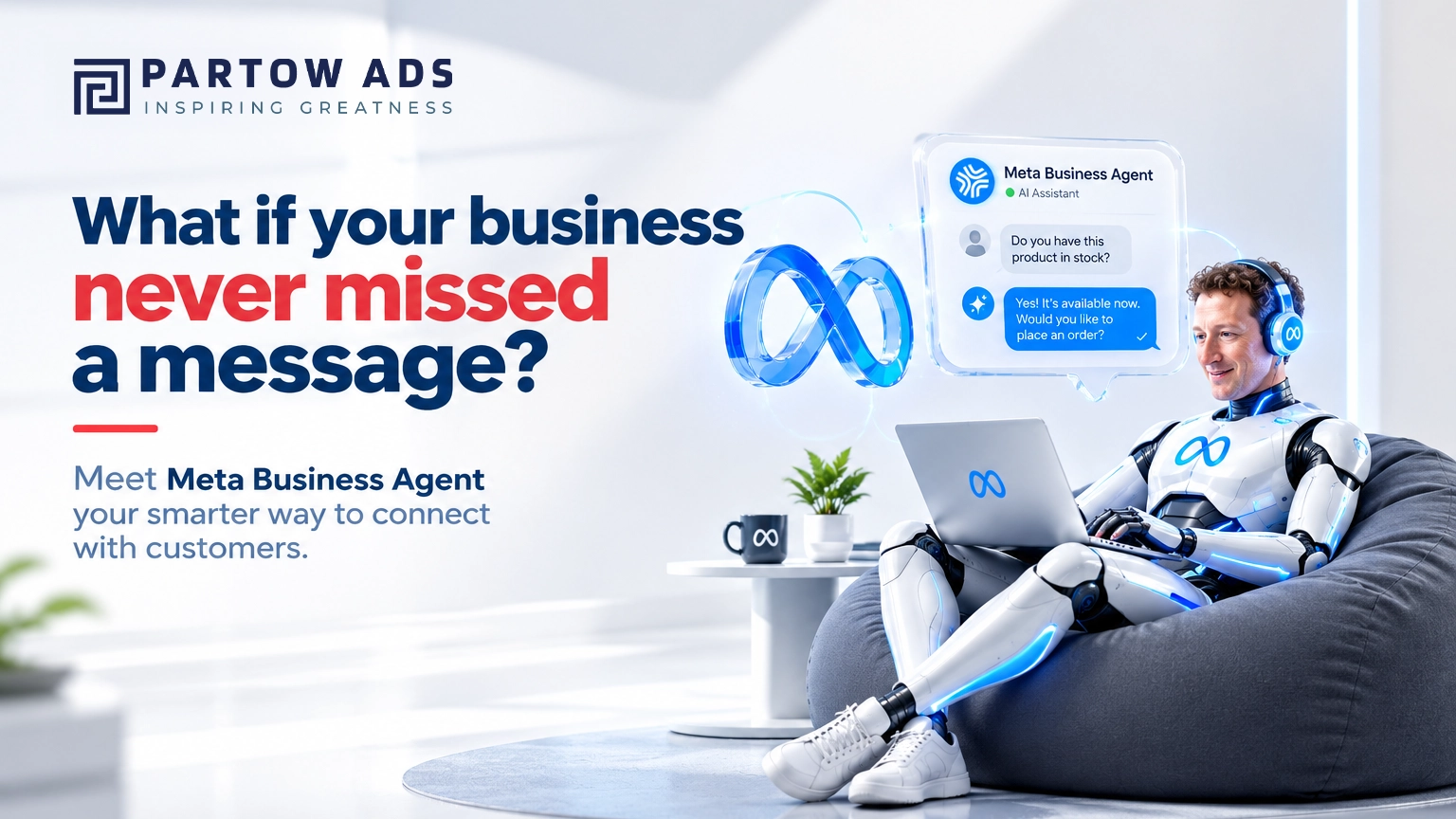
Original editorial illustration: an example of an AI-assisted customer conversation workflow.
Quick answer: Meta Business Agent is Meta’s AI-powered chatbot and business assistant for customer conversations. It can answer business questions, recommend products from a catalogue, book appointments, qualify leads and pass chats to a human. It may not be available to every Malaysian business yet, and what you pay depends on how you use it, so check your WhatsApp Business or Meta account first.
Key takeaways
- What it is: Meta’s AI assistant for customer chats on WhatsApp, Messenger and Instagram, with channel availability that varies by account.
- Availability: WhatsApp’s Help Centre says it is currently offered only to selected businesses in limited countries.
- Cost: free at launch, but charges have since started. The WhatsApp Business app is free up to an allowance, with more capacity through Meta One business plans from US$14.99 a month. On the WhatsApp Business Platform, Meta charges per token for the agent’s AI replies (about 4–5 US cents per message by Meta’s estimate). Prices may vary by region, so check your own account.
- Best first step: a 30-day pilot with one use case, a human handoff route and baseline metrics.
Customer conversations are now part of the buying journey. A potential customer may discover a restaurant on Instagram, ask a retailer about product availability through WhatsApp, or message a service provider after seeing an advertisement. If the business replies late, gives inconsistent information or fails to follow up, that opportunity can disappear.
Meta Business Agent is Meta’s AI-powered business assistant for customer conversations. It can be understood as an AI chatbot for business messaging, but Meta describes capabilities that go beyond fixed menus: answering business-specific questions, recommending products from a catalogue, supporting appointment bookings, qualifying leads and allowing a human team member to step into a conversation. The exact capabilities depend on the account, channel and setup. For Malaysian businesses, the opportunity is relevant: digital audiences are large, customers are accustomed to messaging brands, and many small teams need a more consistent way to handle enquiries.
But an AI agent is not a magic sales machine. Its value depends on accurate business information, clear rules, appropriate integrations, human oversight and a customer journey that works beyond the chat window. This guide explains what Meta has announced, what businesses can realistically expect, and how to assess whether the technology fits a Malaysian operation.
Malaysia’s digital opportunity: why messaging matters
Malaysia’s digital audience provides a strong reason for businesses to take online customer conversations seriously. DataReportal’s Digital 2027: Malaysia report, published in November 2026 and based on the latest available data for October 2026, reports 35.9 million internet users and 38.0 million social media user identities in Malaysia. The report cautions that social media user identities do not necessarily represent unique people, and the figures should not be treated as a count of distinct individuals.
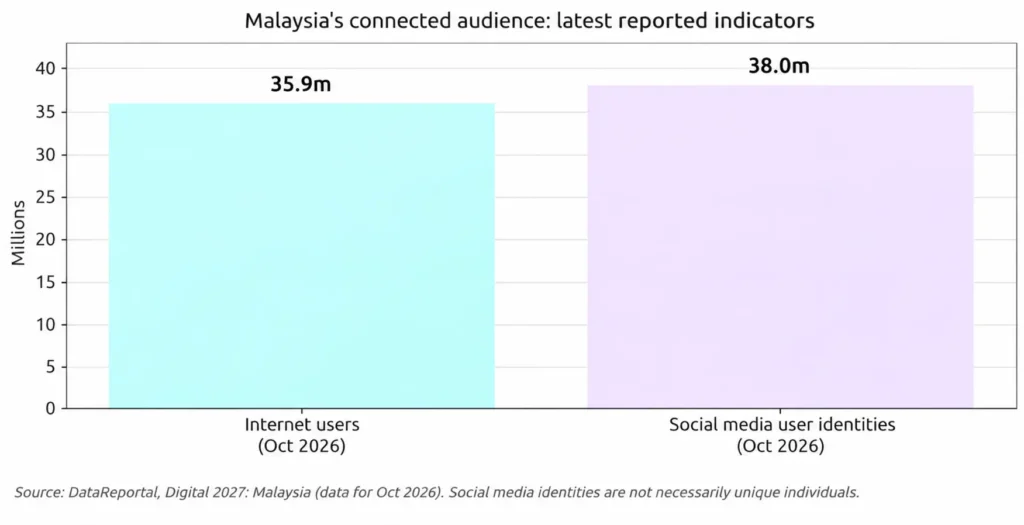
Figure 1. Malaysia digital audience indicators reported for October 2026. The two measures have different definitions and are shown for context, not as directly comparable populations.
The business environment is also moving online. Malaysia’s Department of Statistics reported that e-commerce income generated by establishments reached RM1,288.1 billion in 2024, up from RM1,184.1 billion in 2023. This is establishment e-commerce income across business activities—not a measure of consumer online retail spending alone. DOSM also reported e-commerce gross value added of RM267.6 billion in 2025, equivalent to 13.2% of the economy. Within the 2024 figure, business-to-business transactions made up RM879.6 billion, while business-to-consumer transactions reached RM374.7 billion, up 11.3% on the previous year.
These figures do not prove that an AI agent will increase sales for every company. They do show why digital discovery, online transactions and responsive customer service matter to Malaysian businesses. Messaging also does not replace search: customers still need to find your business first, which is why visibility in Google and AI search (see our guide to SEO, AEO and GEO) remains important.
What is Meta Business Agent?
Meta introduced Meta Business Agent on 3 June 2026. Meta describes it as an AI assistant for businesses that can answer questions about a business, recommend products from a business catalogue, book appointments, qualify incoming leads, allow a team member to step into a conversation, and support sales. Meta also announced the Meta Business Agent Platform, which is intended to let businesses build, customise and deploy agents at scale and connect them with business systems. Meta also said more than one million businesses were already using earlier versions of its business agents on WhatsApp and Messenger before the June launch.
The distinction matters. Meta Business Agent is the business-facing assistant experience. The Meta Business Agent Platform is the infrastructure for more customised, integrated deployments. A small business exploring a ready-made agent has a different implementation requirement from an enterprise connecting an agent to commerce, support and customer-management systems.
Meta said the getting-started experience was free at launch and that paid offerings would follow, and charges have since begun. For businesses on the WhatsApp Business Platform (the API route), Meta’s published pricing lists a flat global rate of US$2.00 per million tokens from 1 August 2026 for the agent’s AI-generated replies (it is not a charge on every WhatsApp message), which Meta estimates at roughly 4–5 US cents per message including delivery. In the WhatsApp Business app, Meta says the agent is free up to an included allowance, with more capacity through Meta One business plans, which Meta announced on 15 September 2026 and which start at US$14.99 a month. Meta notes that plan pricing and availability may vary by region. These are US-dollar indications rather than Malaysian ringgit quotes, and plans, allowances and rates can change, so confirm them in your own account before budgeting.
What can Meta Business Agent do?
1. Answer common customer questions
An agent can handle recurring questions about opening hours, service areas, product details, delivery options, booking procedures or return policies—provided the business supplies accurate, current information and the feature is available for its account. This can reduce repetitive work, but businesses should review answers regularly and make it easy for customers to reach a person.
2. Recommend products from a catalogue
Meta says Business Agent can make product recommendations from a business catalogue. For a retailer, this could help a customer narrow down options by product type, use case or stated preference. Recommendations are only as reliable as the catalogue data: product names, prices, stock status, variants, delivery details and product descriptions must be maintained.
3. AI lead qualification and bookings
For service businesses, an agent can ask structured questions before a staff member follows up. A salon might ask which service a customer wants and their preferred date; a training provider might ask about the course, intake and contact details. The same approach can support Instagram business automation, where available, for example by asking a few structured questions when a customer sends a direct message after seeing a post or advertisement. Businesses must avoid collecting information they do not need and should explain how submitted information will be used.
4. Hand conversations to a human
Human handoff is essential. Complaints, payment disputes, unusual requests, sensitive issues and high-value enquiries may require judgement that an automated assistant should not provide. Set clear escalation triggers, response-time expectations and a visible route to a staff member.
5. Summarise conversations and surface insights
Meta has described a morning briefing and insights from business conversations as part of the agent experience. Treat these as operational aids, not as a substitute for checking the original conversation or measuring outcomes in your own systems.
How does Meta Business Agent work? An illustrative customer journey
A practical deployment starts with business-approved information, not with an open-ended chatbot prompt. The agent needs a defined role, the facts it is allowed to use, the actions it may take, and the situations in which it must stop and transfer the conversation.
| Stage | What happens | Business control |
| 1. Customer enquiry | A person messages the business through an eligible Meta channel. | Clear channel setup and customer expectations. |
| 2. AI response | The agent answers using business information and supported capabilities. | Approved knowledge, tone, language and prohibited topics. |
| 3. Next step | The agent may recommend, qualify or guide a supported action. | Accurate catalogue, booking or integration data. |
| 4. Human escalation | A staff member takes over when needed. | Escalation rules, ownership and service-level target. |
| 5. Review | The business checks conversation quality and outcomes. | Regular audits, corrections and performance metrics. |
Meta Business Agent vs. a traditional chatbot: what is the difference?
The term “AI chatbot” is often used for very different products. A basic rule-based bot follows menus and fixed decision trees. A generative AI assistant can interpret natural-language questions and produce responses based on its instructions and connected information. An AI agent may also be designed to help complete approved tasks through supported tools or integrations. These categories overlap, so businesses should compare actual features rather than rely on product labels. In short, a chatbot describes a conversational interface; an agent points to a system intended to help move a task or customer journey forward. For a business looking for an AI chatbot in Malaysia, the practical question is whether the tool can use approved information, hand over to a person and connect to the systems the team already uses. For the website side of the picture, see our guide to AI chatbots for websites.
| Capability | Rule-based bot | AI assistant | Agent with integrations |
| Fixed menu flows | Strong | Optional | Optional |
| Natural-language understanding | Limited | Strong | Strong |
| Uses approved business knowledge | Usually limited | Can do | Can do |
| Takes actions in connected systems | Usually limited | Depends on setup | Core design goal |
| Needs human oversight | Yes | Yes | Yes |
Meta Business Agent vs. Meta Business Suite
Meta Business Suite is a broader workspace for managing a business’s presence and activity across Meta platforms. Meta Business Agent is an AI-powered conversational capability. They are not interchangeable: one is a business-management environment, while the other is designed to assist with customer conversations. The exact setup path and available controls can change as Meta rolls out features. For more on the wider Meta ecosystem for businesses, see our article on Meta One Malaysia.
Practical use cases for Malaysian businesses
Restaurants, cafés and food businesses
A restaurant could use an eligible agent to answer questions about operating hours, location, menu items, group bookings and event enquiries. Before enabling any booking action, confirm that the agent can access the correct availability source and that customers receive a clear confirmation. Do not let an assistant promise a table, promotion or menu item unless the information is current.
Retail and e-commerce
A retailer could use catalogue-based recommendations to help shoppers compare products, sizes, colours or use cases. Product feeds and inventory integrations need careful testing. If the agent cannot verify live stock or delivery estimates, it should say so rather than invent an answer.
Beauty, wellness and lifestyle services
A salon or beauty business could collect the service a customer is interested in, preferred appointment windows and basic contact details. The agent should not make medical claims, diagnose skin or health conditions, or provide advice outside the business’s approved scope. Route sensitive questions to a qualified professional.
Professional services and B2B companies
A consultancy, training provider or business service firm could use an agent to identify the type of enquiry, company size, project timeline and preferred consultation time. A human team member should review qualified leads before making commitments or providing regulated advice.
Example conversation: a Malaysian beauty salon
The following is an illustrative scenario showing how an AI-assisted conversation might qualify an enquiry. It is not a screenshot or a claim that every step is currently supported by Meta Business Agent in Malaysia.
CUSTOMER: Hi, do you have a hair treatment package this weekend?
AI ASSISTANT: I can help you explore the available treatments. Are you interested in a keratin treatment or a hair repair service?
CUSTOMER: Keratin. How much does it cost?
AI ASSISTANT: I can share the approved package information. Would you like me to connect you with our team to confirm the latest price and available appointments?
HUMAN HANDOFF: A staff member confirms current pricing, availability, and the booking.
Why this matters: the assistant handles the initial qualification, while the business retains control over live prices, appointment confirmation and exceptions.
Not sure which customer questions are worth automating? Our team can help you map the customer journey from first click to first message. Talk to Partow Ads about your use case.
What Malaysian businesses should check before switching it on
Meta’s global announcement should not be interpreted as a guarantee that every feature is immediately available to every Malaysian business. WhatsApp’s own Help Centre currently notes that Meta Business Agent is available only to selected businesses in limited countries, that the option may not appear for every account, and that language support can vary. Check the live availability in the relevant WhatsApp Business or Meta account and confirm the supported languages for the business number.
- Eligibility: confirm that the AI Agent option is visible in the business account and that the account meets Meta’s current requirements.
- Language: test the languages customers actually use, including Bahasa Malaysia and English where relevant. Do not assume every language or mixed-language conversation is supported.
- Knowledge quality: prepare approved FAQs, policies, service descriptions, product details and escalation instructions.
- Accuracy: AI-generated replies can be wrong, and an assistant that lacks information may guess. Keep prices, promotions and policies in the approved knowledge it uses, and set it to hand over to a person rather than invent an answer.
- Pricing: confirm current subscription, per-message and integration costs directly in your Meta account or with your provider. Do not rely on launch-day announcements.
- Human handoff: define who receives escalations, during which hours, and how quickly they should respond.
- Data protection: collect only necessary information, explain its purpose, restrict access and review your obligations under Malaysia’s Personal Data Protection Act 2010 (as amended). Tell customers clearly when they are talking to an AI assistant and how to reach a person.
- Testing: test normal questions, ambiguous questions, complaints, refunds, out-of-stock products, booking changes, and attempts to make the agent go beyond its role.
- Measurement: track outcomes rather than message volume alone.
How to turn on Meta Business Agent
Setup depends on how your business uses WhatsApp, and the option may not appear in your account yet. If it does not, Meta has offered a waitlist for businesses that want access.
Step 1 — Look for the option: In the WhatsApp Business app, open Tools and look for Meta Business Agent. If you do not see it, your account, country or language may not be eligible yet.
Step 2 — Teach it your business: Meta describes setup as training the agent from your past chats and business content, then defining when a person should take over. Add only approved information.
Step 3 — Test before customers do: Ask the questions customers really ask, in the languages they use, including Bahasa Malaysia and English. Correct wrong or vague answers first.
Step 4 — Set up billing if you use the API: Businesses on the WhatsApp Business Platform set the agent up per phone number in WhatsApp Manager, accept Meta’s terms and attach a payment method. Meta’s developer documentation says agent messages are not delivered without billing in place.
Step 5 — Launch small and know how to pause it: Start with one number or one type of enquiry, review conversations daily and make sure a staff member can switch the agent off quickly.
Menu names and availability change as Meta rolls out features, so follow the on-screen instructions in your own account.
Costs: what should you budget for?
Costs depend on how you access the agent. Meta’s launch announcement said getting started was free and that paid offerings would follow, and charges have since begun. For businesses on the WhatsApp Business Platform, Meta’s published pricing lists US$2.00 per million tokens from 1 August 2026 for the agent’s AI replies, which Meta estimates at about 4–5 US cents per message, delivery included. In the WhatsApp Business app, the agent is free up to an included allowance, with more capacity through Meta One business plans from US$14.99 a month; regional pricing and availability may differ. The final cost for a business may also depend on eligibility, the selected plan, connected software, implementation and ongoing maintenance, so treat the figures here as indications and confirm them in your own account.
| Cost area | What to verify | Budgeting note |
| Meta access / subscription | Current usage allowance, Meta One plan (from US$14.99 a month) and eligibility in your account. | Do not assume a permanent free tier. Regional pricing may differ. |
| Messaging | Per-token charges for agent replies on the WhatsApp Business Platform, plus any other channel charges. | Meta also moved ordinary service messages on the API to per-message billing from 1 October 2026; check current rates. |
| Integrations | CRM, catalogue, booking, e-commerce or helpdesk connections. | May involve third-party subscription or development fees. |
| Implementation | Knowledge preparation, conversation design, testing and staff training. | Scope depends on business complexity. |
| Ongoing operations | Monitoring, updates, escalation coverage and reporting. | Treat this as a continuing process, not a one-time setup. |
How to measure whether it is working
A business should define a baseline before launch and compare performance after a controlled pilot. Avoid claiming that automation has increased revenue unless the business can connect conversations to qualified leads, bookings or completed sales.
| Metric | How to define it | Why it matters |
| First-response time | Time from incoming message to first meaningful response. | Shows responsiveness. |
| Resolution rate | Share of enquiries resolved without staff intervention, using a consistent definition. | Indicates automation usefulness. |
| Human handoff rate | Share of conversations escalated to a person. | Helps identify complexity and weak knowledge coverage. |
| Qualified lead rate | Qualified leads divided by eligible enquiries. | Measures lead quality, not just chat volume. |
| Booking / purchase conversion | Completed bookings or purchases divided by attributable eligible conversations. | Connects messaging to business outcomes. |
| Customer satisfaction | Post-conversation rating or structured feedback. | Checks quality and customer experience. |
A simple 30-day pilot plan
Week 1 — Prepare: Choose one use case, document FAQs and policies, identify supported channels, define escalation rules and agree on baseline metrics.
Week 2 — Configure and test: Set up the eligible agent, connect only approved data sources, test common and edge-case questions, and correct inaccurate responses.
Week 3 — Limited launch: Start with a defined audience or enquiry type. Keep human support available and review conversations daily.
Week 4 — Evaluate: Compare response time, resolution, handoff, qualified leads and customer feedback against the baseline. Decide whether to expand, revise or pause.
Where Partow Ads fits in the AI customer journey
An AI agent is only one part of a digital customer experience. Customers still need to discover the business, understand the offer, trust the brand and complete the next step. That is where website design, social media strategy, brand communication and digital marketing work together.
Partow Ads is a Kuala Lumpur-based digital and creative team focused on website design and development, social media management, branding and creative solutions, digital marketing, and photography and video production. For businesses exploring AI-assisted customer communication, the practical starting point is to map the customer journey: where enquiries originate, what customers ask, which information is reliable, and what action should happen next.
Depending on the project, this may involve improving a website’s service information, clarifying social media messaging, structuring FAQs, creating stronger campaign landing pages, or assessing whether an AI chatbot or supported integration is appropriate. If your enquiries come from paid campaigns, it also helps to choose the right campaign goal first; our guide to Meta Ads objectives covers the main options.
Partow Ads is an independent digital and creative team based in Kuala Lumpur. We are not affiliated with Meta and do not represent or operate Meta’s official products. Meta controls its own product, eligibility and platform terms.
READY TO BUILD A SMARTER DIGITAL CUSTOMER JOURNEY?
From professional website design and development to social media strategy, branding, and digital marketing, Partow Ads helps businesses build a clearer customer journey, from discovery and first enquiry to the next step. Talk to the Partow Ads team about improving your digital customer journey.
Frequently asked questions
What is Meta Business Agent?
Meta Business Agent is Meta’s AI-powered assistant for business conversations. Meta says it can answer business-specific questions, recommend products from a catalogue, book appointments, qualify leads, support sales and allow human staff to step into conversations, subject to feature availability and configuration.
Is Meta Business Agent an AI chatbot?
It works like an AI chatbot for business messaging, but it is designed to do more than follow a fixed menu. According to Meta, it can answer business-specific questions, recommend products, book appointments, and qualify leads. Availability, features, and channels depend on the business account, so check what is offered in yours.
Is Meta Business Agent available in Malaysia?
Not necessarily for every business. WhatsApp’s Help Centre says the feature is currently available only to selected businesses in limited countries. Check the AI Agent option in the relevant account and Meta’s current eligibility information.
How do I turn on Meta Business Agent?
If it is available to your account, open Tools in the WhatsApp Business app and look for Meta Business Agent, then follow the setup steps. Businesses on the WhatsApp Business Platform set it up per phone number in WhatsApp Manager. If the option does not appear, check Meta’s eligibility information or join the waitlist.
Is Meta Business Agent free?
Not entirely. It was free at launch, but on the WhatsApp Business Platform Meta has charged per token since 1 August 2026 (US$2.00 per million tokens for the agent’s AI replies, which Meta estimates at about 4–5 US cents per message). In the WhatsApp Business app it is free up to an included allowance, with more capacity through Meta One business plans from US$14.99 a month (pricing may vary by region). Verify the current plan, rates and any integration costs in your own account before deployment.
Can Meta Business Agent work on Instagram and WhatsApp?
Meta announced expansion to Instagram and described support across WhatsApp, Messenger and Instagram. The exact channel and account availability can vary; verify the options shown in your business account.
Can it replace customer service staff?
No. It should be treated as support for a team, not a blanket replacement. Human review is important for complaints, unusual requests, sensitive matters, complex sales and any decision that requires judgement.
Does Meta Business Agent guarantee more sales?
No. It can help businesses respond and guide conversations, but sales depend on demand, offer quality, pricing, fulfilment, customer trust and the wider marketing funnel. Measure attributable outcomes in a controlled pilot.
What should a Malaysian SME prepare first?
Start with a clear use case, accurate business information, updated product or service details, language testing, human escalation rules, privacy review and baseline performance metrics.
Conclusion: start with the customer problem, not the AI trend
Meta Business Agent signals a shift towards more capable AI-assisted business conversations. For Malaysian companies, good AI customer service is not simply about automating replies. It is about making customer communication more consistent, helping people find the right information and routing meaningful enquiries to the right team.
The best first step is a focused pilot around one recurring customer problem. Confirm that the feature is available, prepare accurate information, keep a human escalation path and measure outcomes. When the messaging experience is connected to a clear website, credible brand and well-planned marketing activity, AI can become a useful part of a stronger digital customer journey.
References and further reading
- Meta (3 June 2026) Be There for Every Customer With Meta Business Agent | Official source
- Meta for Developers WhatsApp Business Platform pricing | Official source
- Meta for Developers Meta Business Agent: Get started | Official source
- Meta (15 September 2026) Introducing Meta One | Official source
- WhatsApp Help Centre How to set up Meta Business Agent (availability and setup notes) | Official source
- DataReportal Digital 2027: Malaysia (published November 2026; October 2026 data) | Official source
- Department of Statistics Malaysia Information and Communication Technology Satellite Account 2025 | Official source
- Department of Statistics Malaysia Usage of ICT and E-Commerce by Establishment 2025 | Official source
- Google Search Central SEO Starter Guide | Official source
- Google Search Central Creating Helpful, Reliable, People-First Content | Official source
Categorise
Tags
#advertising (11) #advertising-agency (6) #advertising-strategies (4) #brand-story (1) Branding (7) Marketing (8) narrative-driven branding (1) partow ads (4) social media campaign (1) Strategies (2)
Recent Posts
- Meta Business Agent in Malaysia: Can an AI Chatbot Handle Your WhatsApp and Instagram Customers?
- Go-to-Market (GTM) Strategy in Malaysia

- Digital Marketing for Small Business in Malaysia: 2026 Guide (With RM Budgets)
- Exhibition Checklist Malaysia: Booth, Printing, Gifts & Costs (2026)

- Why Your Website Gets Traffic but No Leads: 10 Conversion Problems to Fix



Leave a Reply